Redemption Code
Overview
A redemption code is a special code associated with a product that gives the user that redeems it additional benefits within the product. Codes may be digital-only, or printed upon physical cards and sold separately at retail.
brainCloud's Redemption Code feature supports the management and implementation of single-use redemption codes.
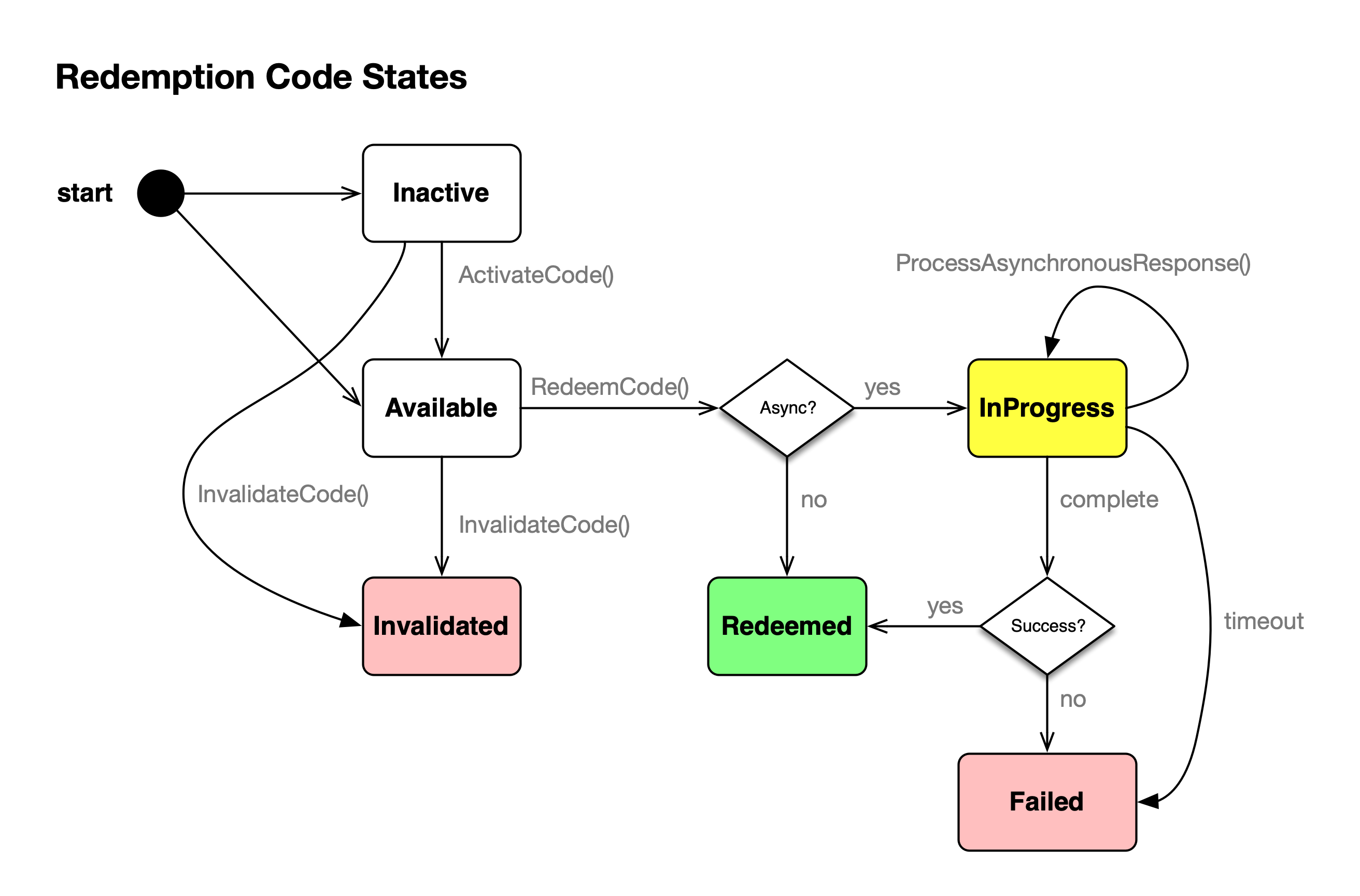
At any time, a redemption code is in one of four states:
| State | Description |
|---|---|
| Inactive | The code has been datafilled in the system, but is not ready to be redeemed. This is useful for retail cards that must be "activated" upon purchase, before they will be ready to be redeemed. [i.e. prevents theft] |
| Available | A code datafilled into the system, and ready to be redeemed |
| InProgress | An asynchronous type code is being asynchronously redeemed and within the allowed processing time |
| Redeemed | A code that has already been redeemed. It will contain information about the user that redeemed it. |
| Invalid | A code that has been invalidated for some reason. [i.e. if a set of retail cards have been stolen, it would make sense for the retailer to invalidate those cards] |
There are currently two ways to add to the redemption code inventory:
- Call the
AddCodemethod on the brainCloud Server-to-Server interface. The API allows you to add a single code at a time. - Bulk upload a RedemptionCode inventory file. Bulk uploads are not yet automated via the portal, so it is done via a support request. (Via the support messaging system). Please allow minimum 48 hours notice for any upload requests.
Once the inventory is in place, the following operations are available from the client API:
[RetrieveRedeemedCodes](/api/capi/redemptioncode/getredeemedcodes)– returns a list of codes that have already been redeemed by this user.[RedeemCode](/api/capi/redemptioncode/redeemcode)– redeem a code
Two additional methods are available via the Server-to-Server API:
ActivateCode( <scanCode>, <codeType>, <customCodeInfo> )– activate a inactive code (i.e. make it available for redemption)InvalidateCode ( <scanCode>, <codeType>, <invalidationReason> )– invalidate a lost or stole (or otherwise fraudulent) code
Management and Support Operations
The web portal offers a few handy management and support operations:
- Design | Marketplace | Redemption Codes
- View code inventories – displays a summary of the state of all codes, by code type
- Delete codes – allows you to delete all the codes of a specified type
- Reset codes – allows you to reset all the codes of a specified type, to the specified initial state
- Global Monitoring | Redemption Codes
- Lookup a specific code
- User Monitoring | Redemption Codes
- View the list of codes that have been redeemed by the selected user
📄️ ActivateCode
Overview
📄️ AddCode
Overview
📄️ GenerateCodes
Overview
📄️ GenerateCodesInline
Overview
📄️ GetRedeemedCodes
Overview
📄️ InvalidateCode
Overview
📄️ ProcessAsynchronousResponse
Overview
📄️ RedeemCode
Overview
📄️ UpdateCustomInfo
Overview